
Inventory and Audit
Regular data center audits are crucial in assuring the accuracy of asset management.
Auditing your Data Center means validating assets and placement, identifying any missing or unaccounted assets as well verifying any moved, added, changed, transferred, unused, decommissioned or disposed assets. NetZoom includes the accessory tools to make data center audits as quick and easy as possible, while maintaining your DCIM solution as the source of truth for the assets in your data center.
Audits can also be used to ensure that changes to the data center are being properly tracked and managed in NetZoom. See the Change Management section of our user manual for more information on Change Management tools in NetZoom.
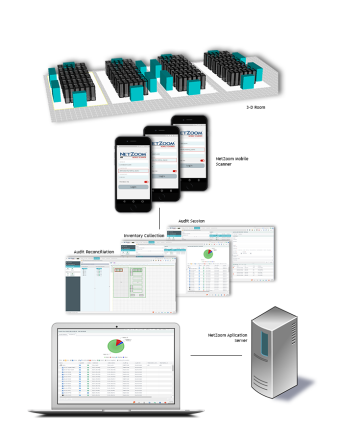
An infrastructure Inventory audit comprises of:
- Audit Session – A session is created and resources are allocated.
- Inventory Collection/log – A log of Inventory and its location is captured.
- Inventory Reconciliation — any discrepancies between NetZoom Enterprise and Audit Inventory is settled.
Audit Session
An Audit can be performed for a data center site, or an area or location, or a row of Racks or for a Tenant infrastructure and may be completed in one or more audit sessions. An Audit session belongs to an explicit location or even a single device or rack in a site (aka Root node).
An Audit session enables an Inventory collection session. An Audit session can be identified by a friendly session name, and ends with the conclusion of Inventory Reconciliation.
Inventory Collection
An Audit session involves an Inventory collection session where one or more users are assigned to Inventory collection. An Inventory collection session is controlled by a Start and End Date, but the session can be closed before the End date. The End Date for a session can be modified any time prior to starting Inventory reconciliation.
A Mobile Scanner App is available for Inventory collection that supports QR code or Barcode scanning in addition to manual data entry; the Mobile Scanner App can access the NetZoom Device library and the NetZoom database for a quick reference and compilation of collected inventory data for each item.
Alternately, a user can collect inventory data directly into an Excel sheet using 3rd party tools. This Excel sheet is importable into an Audit session.
Inventory Reconciliation
Reconciliation is essential to completing an Audit session. The reconciliation phase starts after the Inventory collection session is closed. During reconciliation, new inventory is located and moved, missing or matching inventory is identified. An effort is made to correct the discrepancies between the collected inventory for physical data center floor and the records in NetZoom. During Reconciliation work orders can also be generated for required corrections on physical data center floor.
Analytics are also generated to reflect on performance of procedures in place and prompt actionable measures.
Last Updated: Tuesday, December 22, 2020
NetZoom, Inc.